An introduction to Mascot Distiller
Mascot Distiller Workstation offers a single, intuitive interface to a wide range of native (binary) mass spectrometry data files. A unique algorithm, which fits each peak to a calculated isotope distribution, processes the raw data into high quality, de-isotoped peak lists.
This core functionality can be extended by adding one or more toolboxes. These are optional collections of tools for specific tasks, such as Mascot search result review, automatic and manual de novo sequencing, and batch processing. There is also a developer’s package that provides access to the API of the underlying COM library.
How it Works
Mascot Distiller detects peaks by attempting to fit an ideal isotopic distribution to the experimental data. This ideal distribution is predicted from the elemental composition expected for a peptide of average amino acid composition at that point on the mass scale. The profile of the ideal distribution is then adjusted by varying the mass, resolution, intensity, and charge state, so as to maximise the correlation with the experimental data. Once the best fit has been obtained, the peak is added to the peak list and the corresponding signal subtracted from the spectrum. The process is repeated until all the significant peaks have been fitted.
Similar approaches have been described by
- Berndt, P., et. al., Reliable automatic protein identification from matrix-assisted laser desorption/ionization mass spectrometric peptide fingerprints, Electrophoresis (1999), 20, 3521-6, and
- Gras, R., et.al., Improving protein identification from peptide mass fingerprinting through a parameterised multi-level scoring algorithm and an optimized peak detection, Electrophoresis (1999), 20, 3535-50.
The advantage of this approach over conventional peak detection is that the complete experimental isotopic distribution is fitted, not just the 12C peak. The charge state is automatically determined and the peak list contains only monoisotopic peaks, even when the signal to noise is poor or the isotopic distribution not fully resolved. Smoothing is not necessary or desirable.
Cross-platform data browser
Mascot Distiller supports all the following data file formats:
- Agilent
- DataAnalysis (yep) (LC/MS Trap)
- MassHunter (Q-TOF)
- AB Sciex
- Analyst (QStar, QTrap)
- Data Explorer (Voyager*, 4700, 4800)
- Bruker
- Data/Flex Analysis (yep) (Esquire)
- Data/Flex Analysis (baf) (Apex, MicrOTOF)
- XMASS/XTOF (Reflex, Biflex, etc.)
- TDF (timsTOF)
- Shimadzu
- Kompact (Axima)
- LCMSSolution (LCMS-IT-TOF)*
- Thermo
- Xcalibur (LCQ, LTQ, Orbitrap)
- Waters
- MassLynx (QTof, M@ldi, TofSpec, Synapt)
- mzXML 2.0 and 2.1 (XML interchange format)
- mzML 1.1 (XML interchange format)
- Text (ASCII mass and intensity values)
Optimised Peak Detection
The main problems with conventional peak-picking algorithms are:
- Failure to pick low intensity peaks
- Picking peaks that are just noise
- Selection of the wrong peak(s) or all peaks in an isotopic cluster
- Need to continually “tweak” parameters
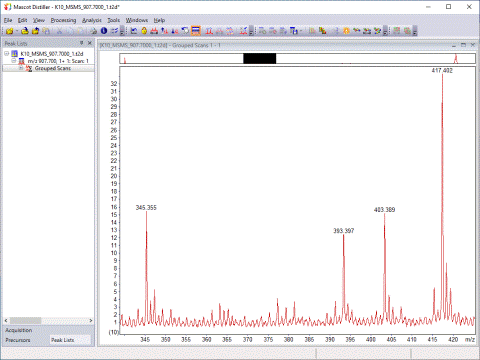
The algorithm used in Mascot Distiller addresses all of these problems by fitting the complete isotope distribution, then applying two thresholds to the peak list – signal/noise ratio and correlation coefficient. The result is peak detection, not noise detection:
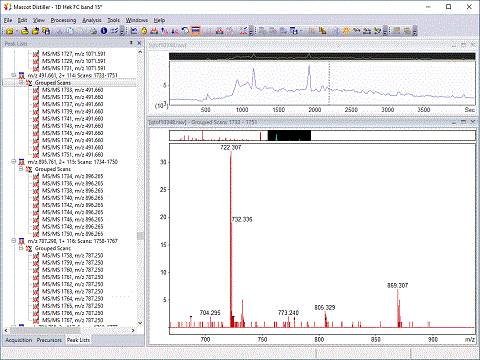
Peak lists can be viewed, sorted, edited and saved to MGF and DTA format files, as well as a comprehensive format that includes additional information for each peak. Peak lists can be submitted direct to a Mascot server for database searching. The entire Mascot Distiller workspace, including peak lists and preferences, can be saved to a project file.
Mascot Distiller core functionality can be expanded using optional Toolboxes.